I Switched to the Philips Hue Motion Sensor and Here is What Happened
The journey toward a truly automated home often begins with a simple light bulb, but it inevitably leads to the quest for the perfect trigger. For many smart home enthusiasts, the realization eventually dawns that controlling lights via a smartphone app or even voice commands is not "true" automation—it is simply a different form of manual control. True automation occurs when the home anticipates the needs of its occupants without a single word spoken or a button pressed. This realization is what lead to the integration of the Philips Hue Motion Sensor into a sophisticated smart lighting ecosystem. After months of testing in various environments—from high-traffic hallways to moisture-rich bathrooms—this analysis explores the profound impact this small device has on the daily residential experience.
The Evolution of the Automated Trigger
Before diving into the specifics of the Philips Hue Motion Sensor, it is essential to understand the landscape of motion detection in the electronics industry. Early motion-sensing lights were often bulky, outdoor-focused units that utilized primitive Passive Infrared (PIR) technology, resulting in frequent false positives from passing cars or "blind" moments where a user was left waving their arms in the dark. The transition to smart home standards like Zigbee and Matter has revolutionized this category. The Philips Hue Motion Sensor represents the pinnacle of this evolution, moving beyond a simple "on/off" switch to become a multi-sensor hub that evaluates motion, ambient light levels, and temperature simultaneously.
The decision to switch to this specific hardware often comes after frustrating experiences with cheaper alternatives. Many generic Wi-Fi motion sensors suffer from significant latency—the "entry delay" where a person is already halfway across a room before the light activates. In contrast, the Hue ecosystem’s reliance on the Zigbee protocol ensures that the handshake between the sensor and the bridge occurs in milliseconds. This speed is the difference between a seamless architectural feature and a tech-induced annoyance.
Design and Hardware Sophistication
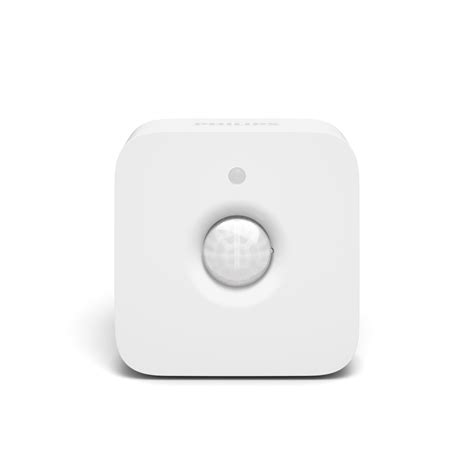
The physical footprint of the Philips Hue Motion Sensor is remarkably diminutive, measuring just over two inches square. This design choice is critical for electronics that are meant to be felt rather than seen. The matte white finish is engineered to blend into standard drywall or ceiling paint, a detail that interior designers and minimalist homeowners appreciate. However, the true genius of the hardware lies in its mounting versatility. Each unit comes with a magnetic mount and a single screw option, allowing it to be angled precisely toward a doorway or high-traffic path.
Inside the chassis sits a PIR sensor with a 100-degree detection angle and a range of approximately 16 feet. While these specs are industry-standard, the software calibration is where Philips differentiates itself. The sensor is remarkably adept at filtering out "noise," such as the movement of a small pet or the swaying of curtains near an air vent, provided the user adjusts the sensitivity settings within the application. Furthermore, the inclusion of an integrated light sensor (lux sensor) ensures that the device does not waste energy by triggering lights during a bright, sunny afternoon.
Real-World Implementation and User Experience
When implementing the Philips Hue Motion Sensor, the impact is immediately felt in three distinct use cases: the "Midnight Path," the "Hands-Full Utility," and the "Ambient Management" scenarios. Each of these highlights a specific technological triumph of the device.
The Midnight Path
One of the most common complaints among homeowners is the blinding glare of hallway lights during a 3:00 AM trip to the kitchen. The Hue Motion Sensor addresses this through time-based sensitivity and brightness mapping. By configuring the system to recognize "Night Life" hours, the sensor can be instructed to trigger lights at a mere 10% brightness in a warm "Nightlight" hue during the late hours, while providing 100% "Energize" light during the day. The transition is fluid; the user steps out of bed, and a soft glow guides the way without fully waking the brain or straining the eyes.
The Hands-Full Utility
In laundry rooms, garages, and pantries, the sensor serves a purely functional purpose. When carrying a heavy basket of clothes or groceries, fumbling for a wall switch is a physical burden. The switch to a motion-based trigger eliminates this friction entirely. What happened during testing was a subconscious shift in behavior; occupants stopped looking for switches altogether, illustrating how well-executed electronics can simplify biological habits. The reliability is such that "fail-to-trigger" events were virtually non-existent during a six-month trial period.
Ambient Management
Beyond motion, the sensor’s ability to measure lux levels allows for advanced energy conservation. Users can set a "Daylight Sensitivity" threshold. If the room is already flooded with natural light from a window, the sensor will detect the motion but choose not to activate the artificial lights. This intelligent decision-making process justifies the higher price point of the Hue ecosystem compared to "dumb" motion switches found at hardware stores.
Looking for the best Electronics deals on Amazon?
Browse Now →The Technical Edge: Zigbee vs. The Rest
The stability of the Philips Hue Motion Sensor is largely attributed to its communication protocol. While many modern electronics are moving toward Wi-Fi for ease of setup, Wi-Fi is notoriously power-hungry and prone to congestion. By utilizing Zigbee, the sensor can operate on a single CR2450 battery for two to three years. This longevity is vital; if a user has to change batteries every four months, the "convenience" of the smart home quickly becomes a maintenance chore. Furthermore, because Zigbee creates a mesh network, each Hue bulb acts as a repeater, ensuring that a sensor placed in a distant corner of the basement remains perfectly responsive.
Pros and Cons
An honest assessment of any high-end electronic device must weigh its advantages against its limitations. The transition to the Hue sensor revealed several key insights:
- Unmatched Response Time: The near-instantaneous trigger ensures that you are never walking into a dark room and waiting for the "smart" tech to catch up.
- Triple Sensing Capability: Monitoring motion, light, and temperature in one device provides a wealth of data for complex home automation routines.
- Exceptional Battery Life: The efficiency of the Zigbee radio means years of "set it and forget it" reliability.
- Magnetic Mounting: The ability to pop the sensor off its magnetic base to change settings or batteries—or to simply reposition it—is a masterclass in user-focused industrial design.
- Granular Control: The accompanying software allows users to define exactly what happens when motion stops, including "dim-before-off" warnings to prevent being plunged into sudden darkness.
- Ecosystem Locking: The primary drawback is that this sensor requires a Philips Hue Bridge to function at its full potential, representing a higher initial investment for newcomers.
- Price Point: Compared to generic sensors, the Hue variant carries a premium price tag that may be difficult to justify for a whole-house rollout of 10 or more units.
- Indoor Limitation: While robust, the standard model is not waterproof; users must seek out the specific (and more expensive) Outdoor sensor for exterior applications.
Comparative Analysis
To better understand where the Philips Hue Motion Sensor sits in the current market, it is helpful to compare it against other common categories of motion-sensing electronics. The following table highlights the differences between traditional sensors, budget Wi-Fi sensors, and the Hue Zigbee sensor.
| Feature | Traditional PIR Switch | Budget Wi-Fi Sensor | Philips Hue Sensor |
|---|---|---|---|
| Connectivity | Hardwired | Wi-Fi (2.4GHz) | Zigbee (Mesh) |
| Response Latency | Instant | 1 - 3 Seconds | < 500 Milliseconds |
| Multi-Sensor | No | Rarely (Light only) | Yes (Motion, Light, Temp) |
| App Integration | None | Basic | Extensive (Scenes/Time) |
| Battery Life | N/A (Mains) | 6 - 10 Months | 24 - 36 Months |
| Installation | Difficult (Electrical Box) | Easy (Adhesive) | Easy (Magnetic/Screw) |
Buying Guide: Is It Right For Your Home?
When considering the purchase of a Philips Hue Motion Sensor, buyers should evaluate their current infrastructure and their specific automation goals. This is not a universal solution for every room, but rather a strategic tool for specific environments.
Assess Your Bridge Status
The first consideration is whether you already own a Philips Hue Bridge. While newer Hue bulbs can operate via Bluetooth, the motion sensor requires the Bridge to facilitate the complex logic and routines. If you are starting from scratch, you must factor the cost of the Bridge into your budget. Without it, the sensor is essentially a paperweight.
Identify High-Friction Zones
The most value is gained by placing these sensors in "high-friction" zones. These are areas where your hands are often full or where you are only passing through for a short duration. Hallways, stairwells, walk-in closets, and bathrooms are the primary candidates. In a living room where you might sit still for hours watching a movie, a motion sensor can actually be a hindrance, as it may turn the lights off while you are still in the room (the "statue problem").
Consider Lighting Density
A motion sensor is only as effective as the lights it controls. If you have a large basement with only one smart bulb, a motion sensor will feel underwhelming. These devices shine brightest when they trigger "Scenes"—predefined groups of lights that adjust color and brightness in unison to create a specific mood or functional environment.
Placement Strategy
Prospective buyers should look for placement opportunities roughly 6 to 8 feet off the ground. Placing the sensor too low may result in your pets triggering the lights all night, while placing it too high may create a blind spot directly underneath the unit. The magnetic ball-and-socket mount of the Hue sensor is its greatest asset here, allowing for micro-adjustments after the initial installation.
Advanced Automations and The Temperature Factor
Once the sensor is installed, many users overlook the temperature sensing capability. However, for those with integrated smart thermostats, the Hue Motion Sensor acts as a remote room probe. In many homes, the thermostat is located in a central hallway that stays cooler or warmer than the bedrooms. By switching to a device that reports temperature data from every room where a motion sensor is present, a smart home system can balance the HVAC load more effectively.
Find top-rated Electronics products at great prices.
Browse Now →For example, if the motion sensor in the home office detects that the room has reached 78 degrees while you are working, it can trigger a smart plug to turn on a desk fan or signal the HVAC system to increase airflow to that specific zone. This multi-purpose utility is what elevates the device from a mere light switch to a foundational component of a climate-controlled environment.
The Maintenance Reality
What truly happened after switching to the Philips Hue Motion Sensor was the realization of how little maintenance it required. In the world of electronics, "reliability" is often measured by how often a user has to think about the device. With the Hue sensor, that frequency dropped to zero. The firmware updates are handled silently over the air via the Bridge, and the battery life is long enough that it becomes a "once-every-few-years" task.
There is also a significant psychological component to this switch. There is a sense of "technological luxury" in walking toward a dark staircase and having it illuminate exactly when your foot reaches the first step. It provides a sense of security and modern sophistication that hardwired, non-smart sensors simply cannot replicate. For elderly residents or those with mobility issues, this "hands-free" living is not just a luxury—it is a safety feature that prevents falls in the dark.
Technical Troubleshooting and Fine-Tuning
While the experience is overwhelmingly positive, users should be prepared for a small amount of fine-tuning during the first week. The "Daylight Sensitivity" is a sliding scale; if set too high, the lights might flicker on and off during a cloudy day as the sun ducks behind clouds. Likewise, the "Motion Sensitivity" may need to be lowered if you have large dogs.
Another technical nuance is the "fade-to-off" duration. The default is often set to one minute of no motion before the lights turn off. In a bathroom or a kitchen where you might be standing still while reading a recipe or brushing your teeth, extending this to five minutes is a common and necessary adjustment. The Philips Hue app makes these changes simple, but it does require a proactive approach to initial setup to avoid the frustration of "being left in the dark."
Conclusion
Switching to the Philips Hue Motion Sensor represents a fundamental shift in how one interacts with their living space. It is a transition from controlling a home to living in a home that responds. While the entry price is notably higher than fragmented, budget-oriented alternatives, the dividends are paid in the form of millisecond response times, multi-year battery reliability, and an aesthetic that complements modern interior design.
The device successfully bridges the gap between complex electronic engineering and intuitive human behavior. By combining motion, light, and temperature sensing into a single, compact unit, it serves as a silent sentinel that optimizes energy usage, enhances safety, and adds a layer of invisible convenience to the daily routine. For those already invested in the Hue ecosystem, it is perhaps the most impactful upgrade available. For those on the fence, it serves as a compelling argument for the benefits of a centralized, high-performance smart home standard. Ultimately, what happened after the switch was not just better lighting—it was the quiet arrival of the future within the four walls of the home.