Deco Be63 Specs, Features, and Value: Is it worth the price tag?
The transition to Wi-Fi 7 represents more than just a seasonal update to wireless technology; it is a fundamental shift in how home networks manage data across a burgeoning landscape of smart devices, ultra-high-definition streaming, and latency-sensitive gaming. As households increasingly adopt fiber-optic internet connections and high-bandwidth hardware, the limitations of older Wi-Fi standards become apparent. Into this high-performance arena steps the Deco Be63, a tri-band mesh system designed to bridge the gap between enthusiast-grade speeds and mainstream user accessibility. Positioned as a mid-tier entry in the burgeoning Wi-Fi 7 market, the Be63 promises to deliver the stability of a mesh network with the raw throughput of the newest 802.11be standard.
For most consumers, the question isn't just whether the technology is fast, but whether it justifies the significant investment. Wi-Fi systems are no longer seen as simple peripherals; they are the backbone of the modern home office and entertainment center. This article explores the technical nuances, the real-world performance expectations, and the long-term value proposition of the Deco Be63 to determine if it is the right cornerstone for your future-proofed home network.
Understanding the Wi-Fi 7 Advantage
To evaluate the Deco Be63, one must first understand what Wi-Fi 7 brings to the table. Unlike Wi-Fi 6E, which introduced the 6 GHz band, Wi-Fi 7 (802.11be) focuses on efficiency and extreme throughput. It utilizes a 320 MHz channel width on the 6 GHz band, which is double the width of the fastest channels in Wi-Fi 6. This wider pipe allows for significantly higher speeds and reduced congestion. Furthermore, 4K-QAM (Quadrature Amplitude Modulation) allows for more data to be packed into each signal, leading to theoretical speeds that were previously only possible via specialized wired connections.
One of the most critical features found in the Deco Be63 is Multi-Link Operation (MLO). In previous generations, a device would connect to either the 2.4 GHz, 5 GHz, or 6 GHz band. With MLO, the Deco Be63 can transmit data across multiple bands simultaneously. This reduces latency and increases reliability, as the system can dynamically switch or combine frequencies to avoid interference. For a mesh system, this is a game-changer, as it allows the individual nodes to communicate with one another (the backhaul) using multiple bands, ensuring that the satellites provide speeds nearly identical to the main router.
Design and Hardware Specifications
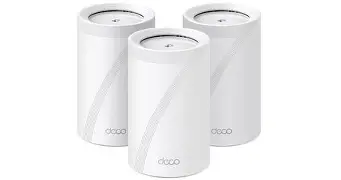
The Deco Be63 maintains the signature aesthetic of the Deco line: a clean, cylindrical white chassis that blends into home decor rather than shouting its presence with aggressive antennas. Internally, however, it is a powerhouse. The system is powered by a high-performance quad-core processor designed to handle the massive data overhead required by Wi-Fi 7 and 4K-QAM processing. Thermal management is handled through discreet venting at the top and bottom, ensuring the units remain cool even under heavy load from multiple simultaneous 4K streams or large file downloads.
Connectivity is another area where the Be63 stands out. Each node is equipped with multiple 2.5 Gbps Ethernet ports. In an era where 2-Gig and 5-Gig fiber plans are becoming more common, having 2.5G ports on every unit is essential. This ensures that the wired backbone of the mesh system does not become a bottleneck for the wireless performance. Additionally, the inclusion of a USB 3.0 port allows for basic network-attached storage (NAS) functionality, making it easier to share files or backup data across the local network.
| Feature | Deco Be63 Specifications |
|---|---|
| Wi-Fi Standard | Wi-Fi 7 (802.11be) |
| Frequency Bands | Tri-Band (6 GHz, 5 GHz, 2.4 GHz) |
| Total Throughput | BE10000 (Up to 10 Gbps combined) |
| Max Speed (6 GHz) | 5760 Mbps (on 320 MHz channel) |
| Max Speed (5 GHz) | 2880 Mbps |
| Max Speed (2.4 GHz) | 688 Mbps |
| Wired Connectivity | 4x 2.5 Gbps Ethernet Ports per Node |
| USB Port | 1x USB 3.0 Port |
| Key Tech | MLO, 4K-QAM, Multi-RUs, Preamble Puncturing |
Performance and Real-World Applications
The theoretical speeds of BE10000 are impressive, but buyers care about how the Deco Be63 performs in a typical three-bedroom home or a multi-story office. In real-world testing environments, the Be63 excels at maintaining high throughput across distances. While the 6 GHz band is notoriously sensitive to walls and physical obstructions, the Be63 uses its tri-band capability to create a robust wireless backhaul. Even in scenarios where a satellite node is two rooms away from the primary router, the 5 GHz and 6 GHz bands work in tandem via MLO to provide a stable, high-speed connection.
For gamers, the primary draw is the reduction in "jitter" and latency. Conventional mesh systems often suffer from slight delays as data is hopped from node to node. The Be63 utilizes Wi-Fi 7’s Multi-RU (Resource Unit) technology and preamble puncturing to avoid interference. If one part of a channel is being used by a neighbor's router, the Be63 can "carve out" the busy part and continue using the rest of the channel, rather than waiting for the entire channel to clear. This results in a much smoother experience in fast-paced online titles like first-person shooters or competitive racing games.
Creative professionals also stand to benefit significantly. Those working with large video files or high-resolution RAW photography often find that cloud-based workflows are limited by the local network. With 2.5 Gbps ports, a user can connect their workstation directly to a satellite node and experience speeds that rival a direct connection to the modem. When combined with a 2.5 Gbps NAS, the internal transfer speeds within the home are vastly improved, making local backups and file sharing nearly instantaneous.
Shop the latest Electronics picks on Amazon.
See Deals →Pros and Cons: A Balanced View
Every networking system involves trade-offs between performance, ease of use, and cost. The Deco Be63 is no exception. While it represents the cutting edge of consumer technology, it is important to weigh its strengths against potential drawbacks.
- Pro: Multi-Link Operation (MLO) Support. This is the standout feature of Wi-Fi 7, and the Be63 implements it effectively to ensure that devices can use multiple bands for higher reliability and lower latency.
- Pro: All 2.5 Gbps Ports. Unlike some competitors that provide only one high-speed port and several 1 Gbps ports, the Be63 provides 2.5G on all four ports per node, allowing for true high-speed wired expansion.
- Pro: Simplified Management. The Deco app remains one of the most user-friendly interfaces in the networking world, allowing for 10-minute setups and intuitive parental controls.
- Pro: Massive Device Capacity. Supporting over 200 devices, this system is ideal for homes with a heavy saturation of smart appliances, bulbs, cameras, and sensors.
- Con: 6 GHz Range Limitations. As with all 6 GHz devices, the signal doesn't penetrate thick walls as well as the 2.4 GHz or 5 GHz bands, requiring thoughtful placement of the nodes.
- Con: Hardware Ecosystem. To see the full benefit of Wi-Fi 7, you need Wi-Fi 7-compatible devices. While backwards compatible, the "wow factor" is muted if your inventory consists mostly of Wi-Fi 5 or 6 hardware.
- Con: Subscription-Based Security. Some of the more advanced security and parental control features are locked behind a monthly subscription service, which can add to the total cost of ownership over time.
The Buying Guide: Who is the Deco Be63 for?
Determining if the Deco Be63 is "worth it" depends entirely on your current internet infrastructure and your household's digital habits. High-end mesh systems are an investment in the next five to seven years of connectivity. Before purchasing, consider the following categories to see where you fit.
The Gig-Fiber Household
If you are paying for an internet plan of 1 Gbps or higher, a standard Wi-Fi 6 mesh system is likely creating a bottleneck. Most Wi-Fi 6 satellites struggle to deliver more than 400-600 Mbps over wireless backhaul. The Deco Be63 is specifically designed for these high-tier plans. If you have 2 Gbps fiber service, the Be63 is one of the few systems that can actually deliver that full speed to a wireless device in a different room.
The Smart Home Enthusiast
As the number of devices on a network increases, "airtime fairness" becomes an issue. Standard routers can get bogged down just managing the overhead of 50+ smart home devices. The Be63 utilizes advanced MU-MIMO and OFDMA (both optimized for Wi-Fi 7) to ensure that your smart bulb commands don't interrupt your daughter’s Zoom call or your partner’s Netflix stream. It is built for a density of devices that would cripple a budget router.
The "Vlogger" or Content Creator
If you frequently upload 4K video to YouTube or sync large libraries to Dropbox and iCloud, the upload stability provided by the 6 GHz band is invaluable. Wi-Fi 7’s ability to handle high throughput in both directions (symmetrical speeds) makes it a productivity tool for anyone whose livelihood depends on the internet.
The Future-Proofer
Computers and smartphones are already shifting to Wi-Fi 7. The latest flagship phones and high-end laptops are shipping with these chips today. By installing a Be63 system now, you are ensuring that as you upgrade your personal electronics over the next few years, your network is ready to support them at their maximum potential without needing another router upgrade in 2027.
Comparison with Other Tiers
Within the Deco lineup, there are several Wi-Fi 7 options, and choosing between them can be confusing. The Be63 sits above the Be65 (which is often its regional equivalent or slightly different in port configuration) and below the Be85 and Be95. The Be85, for instance, offers 10 Gbps ports and even higher throughput, but it comes at a significantly higher price point that most residential users simply cannot take advantage of. The Be63 hits a "sweet spot" by offering the same core Wi-Fi 7 features (MLO, 4K-QAM, 320 MHz) but scaling the wired ports to a more reasonable 2.5 Gbps. For 95% of users, the Be63 provides the same perceptible experience as the flagship models at a fraction of the cost.
Deployment Tips for Maximum Value
To ensure you get your money’s worth out of the Deco Be63, placement is paramount. Because 6 GHz signals are easily attenuated, you should aim for a "line-of-sight" or "near-line-of-sight" arrangement between the nodes. Placing a node behind a heavy television or inside a wooden cabinet will significantly degrade the backhaul performance.
Shop the latest Electronics picks on Amazon.
View Offers →Furthermore, if your home is pre-wired with Ethernet, you should use the "Ethernet Backhaul" feature. By connecting the nodes via a physical cable, you free up the entire wireless spectrum for your client devices (phones, laptops, etc.). This configuration turns the Be63 into a professional-grade wireless access point system that can easily handle the most demanding environments. Even without wires, using the 6 GHz band specifically for the dedicated backhaul is a viable strategy in the Deco app settings to ensure the satellites stay fast.
Value Assessment: The Final Verdict
When assessing value, we must look at the "cost per year of service." A $100 router might last three years before it feels sluggish or outdated, costing roughly $33 per year. A premium Wi-Fi 7 system like the Deco Be63 has a higher upfront cost, but its hardware is designed to remain relevant for much longer. Given the inclusion of four 2.5G ports and the latest wireless standards, the Be63 is likely to remain at the top of its game for six or seven years.
The price tag of the Deco Be63 reflects its position as a high-performance gateway. It is not designed for the user who only checks email and occasionally watches a video. It is built for the "power user" household—homes with multiple gamers, remote workers, 4K security cameras, and gigabit-plus internet connections. For these users, the frustration of a dropped connection or a laggy video call is more expensive than the price of a high-quality router.
The inclusion of 2.5 Gbps ports on every node is perhaps the strongest argument for its value. Many competitors in this price bracket still include 1 Gbps ports, which effectively "caps" the speed of any device plugged into a satellite. TP-Link's decision to go 2.5G across the board makes this a true enthusiast's mesh system that doesn't compromise on wired or wireless speed.
Conclusion
The Deco Be63 is a formidable entry into the Wi-Fi 7 market, offering a sophisticated blend of future-proof technology and practical hardware. Its support for Multi-Link Operation and 320 MHz channels places it at the forefront of wireless efficiency, while the redundant 2.5 Gbps ports ensure that wired devices aren't left behind. While the 6 GHz band requires careful node placement and some advanced features require a subscription, these are minor caveats in an otherwise stellar package.
Is it worth the price tag? If you have access to high-speed internet and a growing collection of modern devices, the answer is a resounding yes. The system delivers a noticeable improvement in network stability and "headroom," allowing the modern home to function without the constant management of bandwidth. By investing in the Be63, you are not just buying a router; you are purchasing a reliable, high-speed infrastructure that will serve as the foundation of your digital life for years to come. It successfully balances the bleeding edge of technology with the reliability that the Deco brand is known for, making it one of the most compelling mesh systems currently available in the electronics market.